

Description
Restore accurate climate readings to your G.A.S controller
The G.A.S Controller Replacement Probe (Pack 22) is a temperature and humidity sensor that replaces worn or faulty probes on compatible G.A.S environmental controllers. It uses a push-fit terminal connection and a 5 metre sensor cable, making it the correct fit for older G.A.S controllers built with exposed wire-style connectors. A controller is only as good as its sensor, so a drifting or damaged probe leaves fans, humidifiers and heaters reacting to bad data.
Key Benefits
- Temperature and humidity probe replacement for compatible G.A.S controllers
- 5 metre cable for flexible sensor placement across the grow room
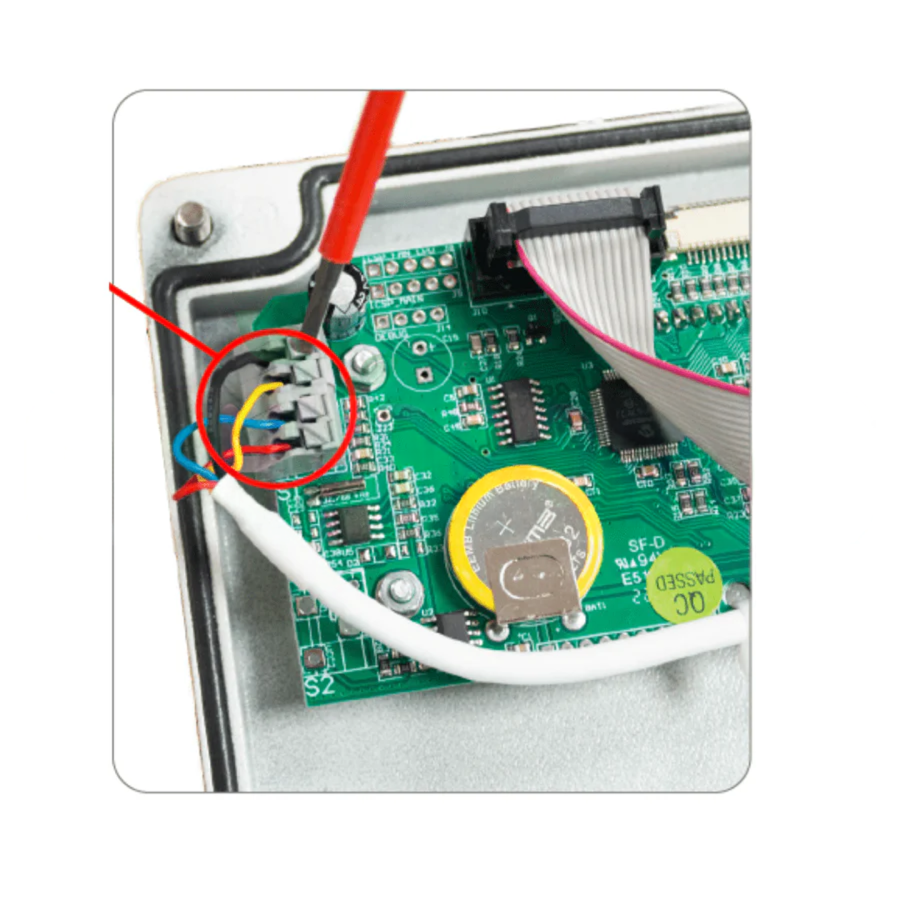
- Push-fit terminal connection suited to older controllers with wire terminals
- Restores accurate monitoring so climate equipment responds correctly again
- Suitable for hydroponics, coco and soil indoor setups
Getting unreliable temperature or humidity readings?
A failing sensor feeds the controller wrong information, and it shows up as fans that will not ramp correctly, humidity that drifts unnoticed, or heat that builds before anything reacts. Fitting a fresh probe returns accurate readings so the controller can properly manage ventilation and climate gear, holding the stable conditions that support root development, nutrient uptake and steady growth through veg and flowering.
How to Use
- Turn off and unplug the controller before starting.
- Remove the back cover to access the push-fit terminal block.
- Disconnect the existing sensor wires from the terminal.
- Insert the new probe wires according to the controller's wiring layout.
- Secure the connections and refit the back cover.
- Position the probe at canopy height, power the controller back on and confirm readings display correctly.
Technical Specifications
- Type: replacement temperature and humidity probe
- Cable length: 5 metres
- Connection: push-fit terminal (wire-style)
- Compatibility: older G.A.S environmental controllers with terminal-block connectors
Check your controller's connection type before ordering to be sure this is the correct replacement for your system.